Reduce 65% your AWS billing implementing these strategies
Amazon Web Services (AWS) stands as the leading cloud platform for businesses across all scales, delivering a comprehensive suite of services from computing and storage to machine learning and AI. Yet this powerful platform requires careful financial management. Organizations frequently discover their AWS costs climbing higher than anticipated, primarily due to suboptimal resource allocation, architectural decisions, or inadequate cost controls.
We're here to show you how to take control of your AWS spending. This article presents proven techniques and best practices that consistently deliver up to 65% reduction in AWS costs. Our targeted strategies will guide you through optimizing your resource usage, selecting cost-effective services, and maximizing AWS's built-in cost optimization features.
Master Right-Sizing for Cost Control
Right-sizing is the strategic process of aligning your AWS instances with your actual workload demands. AWS provides a diverse range of instance types with specific performance characteristics (CPU, memory, storage, and networking capabilities). Through careful analysis and optimization, you can identify opportunities to run your workloads on more efficient instances or with fewer resources than your initial setup.
Essential Steps to Right-Size Your Resources
Leverage AWS CloudWatch for Precise Monitoring: AWS CloudWatch delivers comprehensive metrics on your instances performance, including CPU utilization, memory, disk I/O, and network traffic. These metrics reveal clear patterns that will show you exactly where your instances need adjustment.
Harness the Power of AWS Compute Optimizer: AWS Compute Optimizer delivers data-driven recommendations for optimal instance types based on your specific usage patterns. This powerful tool uses AI to analyze your resources and identify the perfect instance matches for your performance needs.
Eliminate Resource Waste: Take decisive action on instances, databases, and other resources that aren't delivering value. Quickly identify and remove idle resources to immediately reduce costs.
Maximize Savings with Strategic Instance Options: Take advantage of AWS Spot Instances for non-critical workloads and Savings Plans for predictable ones to secure substantial discounts. These proven options consistently deliver significant savings compared to on-demand pricing. Savings Plans excel at reducing costs for stable workloads, while Spot instances offer deep discounts when your workloads can handle instance interruptions.
Cost Impact
Reducing over-provisioned instances directly cuts your AWS costs. Through right-sizing, you can cut EC2 costs by up to 30%. This cost reduction extends beyond EC2 to other services built on it, including EKS/ECS and Lambda.
Implementing Auto Scaling
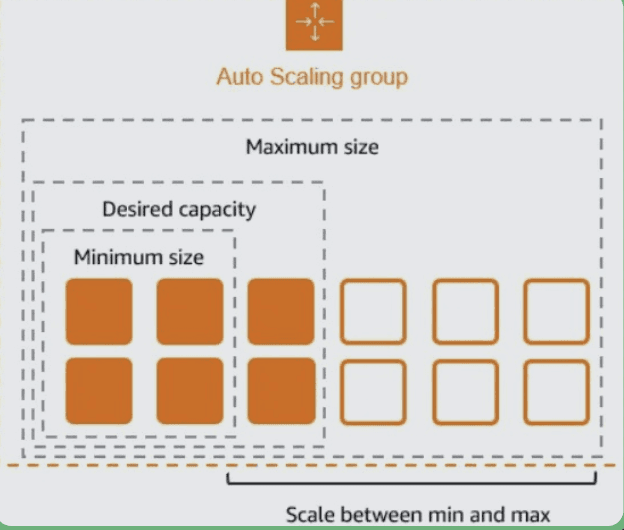
Auto Scaling dynamically manages your AWS resources by automatically increasing or decreasing the number of running instances based on real-time metrics. While traffic is the most common metric used, you can also monitor CPU usage, storage capacity, or memory consumption. This ensures optimal cost efficiency by scaling down during quiet periods and ramping up to handle peak loads.
How Auto Scaling Works
Auto Scaling manages your EC2 instances automatically. It watches your defined metrics (like CPU usage or network traffic) and adds or removes instances when needed. You set the minimum and maximum instance limits, and Auto Scaling handles the rest within these boundaries.
Key Advantages of Auto Scaling
Cost Savings: Auto Scaling delivers immediate cost reductions by dynamically matching compute capacity to your actual needs. Your infrastructure automatically scales down during quiet periods, eliminating waste and maximizing your AWS investment.
Performance Optimization: With Auto Scaling, your infrastructure responds instantly to demand fluctuations,ensuring optimal performance without overprovisioning. When you right-size your instance capacity, the scale-in and scale-out processes work together to deliver substantial cost savings while maintaining peak performance.
Flexible Configuration: Take full control of your scaling strategy with customizable policies based on CPU utilization, memory usage, or custom CloudWatch metrics. Auto Scaling's versatile configuration options enable you to precisely tailor the service to your specific needs.
Cost Impact
Auto Scaling directly cuts your EC2 costs by matching resources to actual demand in real-time. Our customers typically see a 20% reduction in EC2 expenses through efficient resource utilization.
Leverage AWS Reserved
Instances and Savings Plans
AWS offers several cost-saving options for long-term commitments, including Reserved Instances (RIs) and Savings Plans. These options provide discounts in exchange for a commitment to a specific instance type or usage level from 1 to 3 year period.
Reserved Instances (RIs)
With Reserved Instances, you can cut costs by up to 75% compared to on-demand rates. Your savings depend on three factors: how long you commit (1-3 years), how you pay (upfront, partial upfront, or no upfront), and which instance type you choose.
Savings Plans
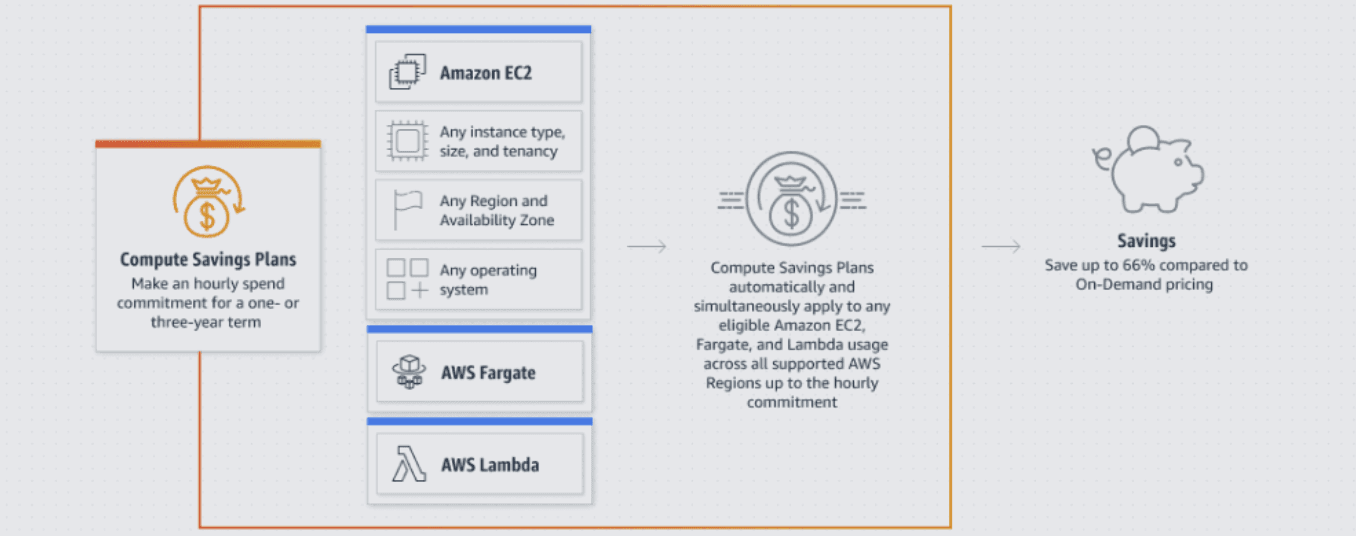
Savings Plans provide greater flexibility than RIs while still offering substantial discounts of up to 66%. Instead of locking into specific instances, you simply commit to using a certain amount per hour over 1 or 3 years. These plans work across any instance type and region. They also cover other services like Lambda and Fargate - not just EC2. We recommend Savings Plans to clients because they're more adaptable and work with various computing needs.
How to Use These Options Effectively
Analyze Your Usage: Before purchasing Reserved Instances or Savings Plans, review your historical usage patterns to determine which instance types and services you will use consistently.
Match Commitments to Future Demand: If you have predictable workloads (e.g., production servers), committing to Reserved Instances or Savings Plans can lead to substantial savings.
Convert Unused Reserved Instances: If your needs change, you can exchange or modify your Reserved Instances in some cases. This flexibility helps ensure you’re not locked into unnecessary costs.
Cost Impact
Leveraging Reserved Instances or Savings Plans for your long-term infrastructure delivers substantial cost reductions of 30% to 75%, with the exact savings determined by your chosen term and payment structure. For organizations with predictable workloads, this proven approach consistently delivers powerful cost optimization results.
Optimize Storage Costs
Storage services in AWS can be expensive if not managed properly. AWS offers several storage options, each designed for specific use cases, and you can optimize your costs by choosing the right storage solution for your needs.
Storage Optimization Strategies
S3 Lifecycle Policies: AWS S3 provides multiple storage classes including S3 Standard, S3 Infrequent Access, and S3 Glacier. Using S3 lifecycle policies, you can automatically transition data to more cost-effective storage classes based on usage patterns. For instance, rarely accessed data can be moved to S3 Glacier, which costs significantly less than standard storage. Before implementing lifecycle rules, analyze your largest buckets and their data access patterns to determine the best strategy for your workloads. You can use S3 Storage Lens to examine these patterns and measure your bucket data volumes.
S3 Intelligent Tiering: S3 Intelligent Tiering automatically monitors access patterns and moves data between storage tiers to optimize costs. Without any human intervention or performance impact, it shifts objects to lower-cost tiers when they're accessed less frequently. The service charges a small monthly fee for monitoring and automation, but delivers consistent savings by ensuring your data always resides in the most cost-effective storage tier.
Use EBS Snapshots Efficiently: When utilizing Amazon Elastic Block Store (EBS) for persistent storage, it's crucial to implement a comprehensive storage management strategy. This includes carefully monitoring and adjusting volume sizes to prevent over-provisioning, which can lead to unnecessary costs. Additionally, maintain a regular schedule for reviewing and cleaning up your storage resources - this means identifying and removing outdated snapshots that no longer serve a purpose in your backup strategy, as well as decommissioning volumes that aren't actively supporting your workloads. Implement automated cleanup procedures where possible, using AWS Systems Manager or custom scripts to systematically identify and remove unused EBS resources, ensuring your storage costs remain optimized while maintaining necessary backup coverage.
Leverage Amazon EFS or FSx: When it comes to shared file storage solutions, Amazon EFS (Elastic File System) and FSx provide highly scalable and flexible options, each tailored to specific workload requirements. Amazon EFS excels at Linux-based workloads and offers automatic scaling with pay-as-you-go pricing, while FSx provides Windows- compatible file systems with various performance tiers. Evaluate your specific needs around file sharing, throughput requirements, and access patterns to select the most cost-effective solution. Consider factors like file system protocol compatibility (NFS vs. SMB), throughput requirements, and whether you need features like Windows ACLs or Linux permissions to make an informed choice that balances performance and cost-effectiveness.
Cost Impact
By selecting the right storage service and configuring lifecycle policies, you can reduce your S3 and EBS storage costs by up to 30% or more, depending on the volume of data and the chosen storage classes.
Optimize Networking Costs
Data transfer costs between AWS regions, availability zones, and the internet can have a substantial impact on your monthly AWS bill. Understanding these networking costs and implementing effective control measures is crucial for maintaining a cost-efficient cloud infrastructure. Let's explore the key aspects of AWS networking costs and discover proven strategies to optimize your spending
Strategies to Reduce Networking Costs
Use Amazon CloudFront: Deploy CloudFront CDN to serve content efficiently and reduce latency. This powerful content delivery service strategically caches your content at edge locations worldwide, significantly reducing expensive data transfer costs while simultaneously enhancing application performance and user experience. By serving content from the edge location nearest to your users, CloudFront minimizes the distance data needs to travel, resulting in both cost savings and improved response times.
Avoid Cross-Region Data Transfers: Keep your resources in the same region as your users whenever possible to minimize data transfer costs. This fundamental best practice eliminates expensive cross-region data transfers and reduces latency. When designing your architecture, carefully consider the geographic distribution of your user base and place resources strategically to optimize both costs and performance. If you must transfer data between regions, plan these transfers carefully and implement efficient data replication strategies.
Consolidate Your VPCs: Reduce costs by combining Virtual Private Clouds (VPCs) that frequently communicate with each other. Leverage AWS PrivateLink or Direct Connect for efficient private networking, which provides secure and reliable connectivity while minimizing data transfer costs. This consolidation not only optimizes networking expenses but also simplifies your infrastructure management and improves overall network performance. Consider implementing VPC peering where appropriate to enable direct communication between VPCs without going through the public internet.
Cost Impact
Effective networking optimization can reduce data transfer costs by up to 20%, particularly for applications that handle large volumes of data.
Conclusion
The tools and practices explained will empower you to reduce your AWS costs by up to 65% while maintaining optimal performance. By making cost management a core part of your operations, you'll continue to discover new opportunities for savings as your infrastructure evolves and grows.
" width="205px"/></svg>)


